tricks for nokia users
Turn on/off the "click" sound made by the camera by selecting the 'Silent' profile or by turning warning tones on/off:
Menu > Profiles > "select your activated profile" > Personalise > Warning tones > On/Off.
(This also effects the sound of Java games and apps).
To change background image go to:
Menu > Tools > Settings > Phone > Standby mode > Background image > Yes > "choose an image".
The best size for background images is 174x132 pixels.
Display an image when someone's calling:
Menu > Contacts > "select a contact card" > Options > Edit > Options > Add thumbnail > "choose an image".
Add a personal ringing tone to a contact:
Menu > Contacts > "select a contact card" > Options > Open > Options > Ringing tone > "choose a ringing tone".
Delete all messages from your Inbox at once:
Menu > Messaging > Inbox > Options > Mark/Unmark > Mark all > Options > Delete.
Send or hide your caller ID: Go to: Menu > Tools > Settings > Call > Send My
Caller ID > 'Yes', 'No' or 'Set By Network' to follow the default settings of your home network
Saturday, November 20, 2010


OPEN YOUR CD DRIVE EASILY
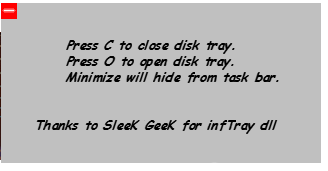
hi friends this freeware will be very useful to all of you
If your tray button is not working then you use a pin to open the drive but it is not very convenient to use the pin every time.
So you can use OCTray to open your drive easily.
OCTray is a Freeware using which you can easily open/close your CD/DVD drive.
Double click on the exe file . Doing this will open a window after which you can open your drive by pressing O and close it using C on the keyboard. so easy to use!!!!
OCTray1
Or you can simply double click on the icon in the taskbar and select Open or Close from the context menu.
Download OCTray
note:
If there is a problem with your hardware then you can’t eject your tray even by using this utility.
CLEAN UP YOUR DISK WITH DISK SPACE FAN
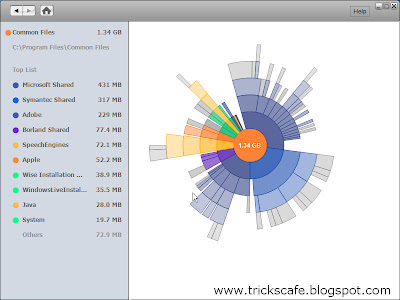
Disk Space Fan is a freeware and it is a nice disk space analysis tool for Windows.
It helps to free up disk space by quickly finding and deleting big, useless files.
It displays disk space usage with a nice chart. You can navigate the folders easily with the chart. It is also intergrated with Windows Explorer to open, delete and browse files or folders.
Features:-
Scans directories and drives to find out the useless and larger files.
Full compatibility with 32 and 64 bit Windows
Browse/open/delete files on ringschart
Diagram of a flower show in the form of free disk space
Save scan history
Preview a picture on ringschart
Support for Unicode
Network path support
DOWNLOAD IT HERE
It helps to free up disk space by quickly finding and deleting big, useless files.
It displays disk space usage with a nice chart. You can navigate the folders easily with the chart. It is also intergrated with Windows Explorer to open, delete and browse files or folders.
Features:-
Scans directories and drives to find out the useless and larger files.
Full compatibility with 32 and 64 bit Windows
Browse/open/delete files on ringschart
Diagram of a flower show in the form of free disk space
Save scan history
Preview a picture on ringschart
Support for Unicode
Network path support
DOWNLOAD IT HERE
LOCK YOUR COMPUTER
To create a shortcut on your desktop to lock your computer:
>Right-click the desktop.
>Point to New, and then click Shortcut.
>The Create Shortcut Wizard opens. In the text box, type the following:
rundll32.exe user32.dll,LockWorkStation
>Click Next.
Enter a name for the shortcut. You can call it "Lock Workstation" or choose any name you like.
Click Finish.
You can also change the shortcut's icon
To change the icon:
>Right click the shortcut and then select Properties.
>Click the Shortcut tab, and then click the Change Icon button.
In the Look for icons in this file text box, type:
Shell32.dll.
Click OK.
Select one of the icons from the list and then click OK
>Right-click the desktop.
>Point to New, and then click Shortcut.
>The Create Shortcut Wizard opens. In the text box, type the following:
rundll32.exe user32.dll,LockWorkStation
>Click Next.
Enter a name for the shortcut. You can call it "Lock Workstation" or choose any name you like.
Click Finish.
You can also change the shortcut's icon
To change the icon:
>Right click the shortcut and then select Properties.
>Click the Shortcut tab, and then click the Change Icon button.
In the Look for icons in this file text box, type:
Shell32.dll.
Click OK.
Select one of the icons from the list and then click OK
UNLOCK ANY PDF FILE

some time it happens that PDF files are password protected?
Do you wish to remove its restrictions?
Then here is some thing for you.
You can easily remove password and other editing restrictions with FreeMyPDF.com.
With FreeMyPDF you can remove printing, copying, editing restrictions from PDF files.
the best part is
FreeMyPDF is a free service and doesn’t require any sign-ups. This service only works for PDFs that you can open and read without any 3rd party plugins.
Just upload PDF files to FreeMyPDF.com and click Do it button.PDF file restrictions will be removed and you will get a download dialog box.Save the unlocked PDF to your PC.
done!!!!!!!!!!!!
INSTALL WINDOWS XP FASTER
Install Windows xp in less than 15 minutes
yes friends its true
this trick will be very helpful for those who frequently install windows xp operating system. Normally OS installation takes around 40 minutes to complete, but through this trick you can now save 10-15 minutes.
steps are :
1. Boot through Windows XP CD.
2. After all the files are completely loaded, you get the option to select the partition. Select “c”.
3. Now Format the partition, whether it is normal or quick with NTFS or FAT
4. Once the formatting is completed, All the setup files required for installation are copied. Restart your system by pressing Enter.
Now begins the Simple trick to save your time .
5. After rebooting, you get a screen where it takes 40
minutes to complete or finalize the OS installation.
6. Now, Press SHIFT + F10 Key -> This will open command prompt.
7. Enter “Taskmgr” at the command prompt window. This will open Task Manager.
8. Click the Process Tab, here we find a process called Setup.exe -> Right Click on Setup.exe -> Set Priority -> Select High or Above Normal. Initially it will be Normal.
thats it done!!!!
View DOCX/XLSX Files Without Using Microsoft Word/Excel
Many of them have problem of reading DOCX files in your desktop, while your desktop reads only .doc files?
here is a solution for you all
But please note that this is only the word document viewer not editor so it does not allow editing word documents.
here is a solution for you all
But please note that this is only the word document viewer not editor so it does not allow editing word documents.
This tools is provided free by Micorosoft itself & can be downloaded easily from their site.
And it is just 25 MB large. It enables you to view, print and copy Word documents, even if you don’t have Word installed. Not only *.docx it also supports *.docm,*.rtf,*.txt,*.html,*.wpd,*.doc,*.xml, etc.
Click here to download Microsoft Word Viewer.

Accept or save the file.
You can also try Microsoft Excel viewer. Click here to download Microsoft Excel Viewer. It allows you to view all the versions of excel files.
feel free to leave your comments.............
Subscribe to:
Posts (Atom)